Facebook is also one of the most popular Social Networking website. It provides many features like connecting to friends, sharing the photos, chat options & so on. But once you fed up with it and do not want to be continued, the account can be deleted / deactivated. It can be done in the following two ways.
Unlike the Deactivation, this will delete your profile and all data related to you permanently from the facebook.
It can be done by following the below procedure.

You can also delete your account permanently by directly contacting facebook team at privacy@facebook.com.
- Make Your account deactivated. (Deactivate facebook account)
- Permanently deleting the account.
Unlike the Deactivation, this will delete your profile and all data related to you permanently from the facebook.
It can be done by following the below procedure.
- Log in to Facebook and open the Deletion page by clicking the below link.

- Now delete account page will appear. Click on Delete my account button.
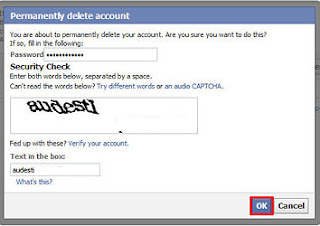
- A new pop up window will appear asking to re-renter the password.

- Enter the text Captcha text displayed in the screen. Click on Ok button.
- Now you account is permanently deleted.
You can also delete your account permanently by directly contacting facebook team at privacy@facebook.com.


No comments:
Post a Comment